Defining Executive Needs
_1.jpeg)
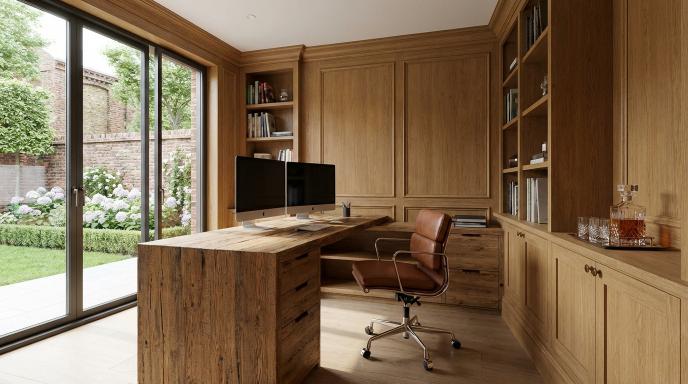
Executive home offices must prioritise ergonomic health and streamlined workflows to support 8+ hour workdays while preventing RSI injuries affecting many remote workers. These spaces blend C-suite aesthetics with medical-grade ergonomics, drawing from OSHA guidelines and insights from Harvard Business Review on executive productivity. The result supports the 15-minute commute lifestyle by creating an ultimate home office that boosts focus and wellbeing.
Executives need setups that handle high-stakes tasks without fatigue. Think adjustable desks for standing transitions and chairs with proper lumbar support. This foundation prevents strain during long video calls or strategy sessions.
OSHA ergonomic guidelines emphasise neutral body positions to avoid repetitive injuries. Pair this with executive touches like dual monitor setups and noise-cancelling headphones for a professional ambiance. These elements form the core pillars for your home office design foundation.
Transitioning to specifics, focus on ergonomic priorities and productivity workflows as key pillars. This approach ensures your executive workspace delivers both health and efficiency for work from home demands.
Ergonomic Priorities
Position your monitor at eye level (top of screen at eye height) using a 28-32" 4K monitor on a fully adjustable VariDesk Pro Plus 36 to reduce neck strain. This aligns with office ergonomics best practices for the ultimate home office. Experts recommend such adjustments to maintain posture during extended remote work sessions.
Follow this OSHA-compliant ergonomic checklist for your executive home office: Desk height at 25-29 inches, such as the Jarvis Bamboo Standing Desk. Chair with lumbar support, like the Herman Miller Aeron. Feet flat on the floor or using a footrest, for example the Fellowes Microban. Keyboard tray positioned at elbow height for neutral wrist alignment.
Reference ANSI/HFES 100-2007 standards to guide your standing desk and ergonomic chair choices. Incorporate a footrest or standing mat to support circulation. Add wrist rests and blue light glasses for complete RSI prevention in your WFH office.
For visual RSI prevention, imagine a simple diagram: monitor at eye level, elbows at 90 degrees, feet supported. This setup in your productivity office promotes long-term health, integrating natural light and office plants for a biophilic design touch.
Productivity Workflows
Implement a dual-zone workflow: 80/20 rule where 80% deep work uses Pomodoro Technique (25min work + 5min break via Focus Booster app, free) and 20% admin handled by keyboard shortcuts. This structures your executive workspace for peak efficiency. It suits the no-commute benefits of a 15-minute commute home office.
Map these three executive workflows for your home office design: Strategy sessions with dual 27" Dell UltraSharp monitors. Video calls using Logitech Brio 4K webcam for clear Zoom or Microsoft Teams meetings. Task management in Notion workspace with Pomodoro timer integration.
Adopt the GTD methodology by David Allen to organise tasks into capture, clarify, and execute phases. Use dual monitor setup for one screen on emails and another for documents. Integrate cable management and a docking station for seamless multi-monitor flow.
Enhance your productivity office with noise-cancelling headphones, a mechanical keyboard, and ergonomic mouse. Add desk organisation like pegboard organisers or floating shelves. Research suggests such workflows improve focus, making your ergonomic office ideal for executive productivity and work-life balance.
Garden Offices
Design Your Perfect Garden Office
SIPs-insulated, gigabit-ready workspaces built for year-round London use. Ditch the commute — start working from the bottom of your garden.
Optimal Space Selection
Select a 10x10ft minimum space with <45dB ambient noise using the Room EQ Wizard app (free) to measure acoustics before committing. Location plays a key role in creating the ultimate home office for executives embracing the 15-minute commute. Prioritise areas with ample natural light and clear separation from household distractions.
Choose rooms on upper floors or corners to reduce foot traffic interference. Test for echo levels by clapping and listening for reverb; aim for quick decay. Integrate office plants like fiddle leaf figs to soften acoustics naturally while boosting biophilic design.
Ensure proximity to high-speed internet points for seamless video conferencing. Avoid spaces near kitchens or play areas to maintain a professional ambiance. This setup enhances focus in your executive workspace, supporting productivity hacks like Pomodoro timers.
Measure light levels with a phone app targeting over 500 lux for the day. Combine with smart lighting for consistent illumination. Proper selection transforms any home into an ergonomic office rivaling corporate towers.
Quiet Zone Criteria
Test room acoustics with free Room EQ Wizard software; target RT60 reverb time <0.5 seconds for calls using Auraless Studiofoam panels (12-pack, $199). A dedicated quiet zone is essential for the executive home office, minimising disruptions during virtual meetings on Zoom or Microsoft Teams. Follow this 7-point checklist to achieve professional-grade soundproofing.
- Keep sound levels <45dB using a sound meter app for baseline measurements.
- Install door sweep + weatherstripping ($25) to block external noise leaks.
- Add window acoustic curtains (Nicetown 2-pack, $40) for layered sound barriers.
- Use a white noise machine (LectroFan Evo, $50) to mask residual hums.
- Maintain distance >15ft from HVAC units to avoid mechanical vibrations.
- Place a thick rug + pad to absorb floor echoes effectively.
- Incorporate plants for sound diffusion, such as succulents, for natural scattering.
Before upgrades, rooms often exceed 60dB with echoes; after, drop to under 40dB for crystal-clear calls. Pair with noise-cancelling headphones for added protection in your WFH office. This creates a true focus zone for executive productivity.
| Before Upgrades | After Upgrades |
|---|---|
| Ambient: 55-65dB Reverb: 1.2s | Ambient: 35-45dB Reverb: 0.4s |
Furniture Essentials
Invest in a 72" L-shaped executive desk like the Eureka Ergonomic L60 providing 110" total workspace for dual monitors plus notebook. This setup anchors your executive home office and supports the 15-minute commute lifestyle by keeping everything within reach. Premium materials ensure longevity in your ultimate home office.
Focus on modularity and adjustability to adapt to changing needs in remote work setups. An adjustable desk allows seamless shifts between sitting and standing, boosting office ergonomics. Pair it with a high-back ergonomic chair for all-day comfort during virtual meetings.
Incorporate premium materials like solid wood or bamboo for a luxury desk aesthetic that elevates your executive workspace. Add modular furniture such as floating shelves for desk organisation and cable management. These choices create a professional ambiance without clutter.
Experts recommend pairing your desk with an ergonomic chair and footrest to maintain posture in WFH offices. Include a filing cabinet or pegboard organiser for efficiency. This foundation drives daily comfort and productivity in home office design.
Executive Desk Systems
Choose desk by workflow: single monitor (48" Uplift V2, $599), dual monitor (72" L-shaped Eureka, $699), or standing (Flexispot E7, $499 with 154lbs lift capacity). These options suit various executive home office needs, from compact setups to expansive multi-monitor configurations. Select based on your daily tasks like video conferencing or focused writing.
A standing desk promotes health in long work-from-home sessions, while L-shaped designs maximise corner space in apartment offices. Look for electric height adjustment ranging from 25-50 inches for personalised ergonomics. Weight capacities up to 154lbs handle heavy dual monitor setups securely.
| Desk | Price | Size | Height Range | Weight Capacity | Best For | 5-Year Warranty |
|---|---|---|---|---|---|---|
| Uplift V2 | $599 | 48-72" | 25-50" | 355lbs | Dual monitor exec | Yes |
| Herman Miller Canvas | $2,500 | Modular | Custom | 400lbs | Premium C-suite | Yes |
| Flexispot E7 Pro | $649 | 48-72" | 22.6-48.4" | 355lbs | Health-focused | Yes |
| Branch Duo | $799 | L-shaped | 28-48" | 275lbs | Video production | Yes |
| IKEA Bekant | $399 | 63x31" | 24-49" | 154lbs | Budget starter exec | No |
Match your pick to productivity needs, like the Branch Duo for Zoom setups with ample surface for webcam and notes. Modular systems like Herman Miller offer expansion for growing executive workspaces. Always verify warranty for peace of mind in your remote work setup.
Technology Integration
_2.jpeg)
Technology powers the ultimate home office for executives embracing the 15-minute commute. Essential tools handle simultaneous tasks like email, spreadsheets, and video calls in a seamless remote work setup. Smart integration boosts productivity in your executive workspace.
Deploy a triple-monitor setup with Dell UltraSharp U2723QE 27" 4K monitors connected via CalDigit TS4 Thunderbolt dock. This configuration supports laptop charging up to 98W while managing multiple displays. It fits perfectly into an ergonomic office with a standing desk.
Consider bandwidth needs for smooth video conferencing on Zoom or Microsoft Teams. Aim for high-speed internet with a mesh network to avoid lag during virtual meetings. Add a docking station for cable management in your productivity office.
Enhance your WFH office with noise-cancelling headphones and a quality webcam. These elements create a professional ambiance for daily calls. Integrate smart lighting for better focus in the executive home office.
Multi-Monitor Setups
Configure dual 27" 4K monitors at 3840x2160 resolution and 60Hz using DisplayPort 1.4 daisy-chaining. Pair them with a CalDigit TS4 dock for your dual monitor setup in the home office design. This arrangement speeds up data review in an executive desk environment.
Option one uses two Dell UltraSharp U2723QE 27" monitors with VESA 100x100mm mounts. Connect via USB-C cables rated for 65W power delivery. Adjust Windows or macOS display settings to extend desktops for multitasking.
- Dual landscape setup: Two 27" Dell U2723QE monitors for balanced viewing during spreadsheet work.
- Ultrawide plus vertical: 49" Samsung Odyssey G9 curved monitor paired with a 24" secondary for coding or documents.
- Triple budget option: Three 24" Dell P2424H monitors on an adjustable arm for cost-effective multi-monitor expansion.
Secure mounts to your L-shaped desk or wall for optimal office ergonomics. Use a surge protector and UPS system to safeguard against power issues. This keeps your productivity office running smoothly with natural light from nearby windows.
Lighting and Acoustics
Achieve 500-1000 lux task lighting with BenQ e-Reading LED Desk Lamp ($199, 24 brightness levels) plus circadian smart bulbs (Philips Hue, $50/bulb) synced to 6500K daylight. This setup supports the IESNA lighting standards for executive workspaces. It reduces eye strain during long video conferencing sessions in your ultimate home office.
Layer your lighting plan for optimal control. Start with task lighting like the BenQ WiT lamp at over 500 lux. Add ambient options such as Philips Hue White Ambiance 4-pack ($150) and bias lighting from Govee LED strips ($30) behind your curved monitor.
Proper lighting enhances focus in a 15-minute commute lifestyle. Experts recommend combining these layers to mimic natural light. This approach suits remote work setups with dual monitor configurations.
Acoustic treatment completes the productivity office. Install 24 sq ft of Auralex panels ($250) on walls to dampen echoes. Pair them with noise-cancelling headphones for clear Microsoft Teams calls in your executive home office.
Aesthetic and Branding
Establish C-suite presence with a Fiddle Leaf Fig plant ($80, 6ft), brass desk accessories (Raynor & Co set, $250), and custom gallery wall using 16x20" motivational prints framed in Nielsen #170 black ($15 each). These elements create an executive aesthetic that signals authority in your ultimate home office. They blend seamlessly into the 15-minute commute lifestyle, enhancing your remote work setup.
Follow an executive aesthetic formula: 40% biophilic with at least three plants like Fiddle Leaf Fig, Sansevieria, and succulents for natural vitality. Allocate 30% to branded art featuring company colours and achievement prints to reinforce professional identity. Add 20% textures such as leather folios and wood coasters, plus 10% personal touches like a family photo in an 8x10 frame.
Incorporate office plants to boost biophilic design, improving air quality and focus in your WFH office. Use wall art and motivational posters in executive colours for a professional ambiance. Textures add sophistication, while personal items humanise the space without distraction.
Draw office inspiration from platforms like Pinterest and Houzz for home office design ideas. Experts recommend branded elements to strengthen client impressions during video conferencing. This approach elevates your executive workspace for peak productivity.
Health and Wellness Features
Combat sedentary risks with Levo anti-fatigue standing mat ($40, 65% fatigue reduction), Dyson Pure Cool air purifier ($399, 99.97% particle capture), and blue light blocking glasses (Felix Gray, $95).
These essentials form the foundation of a healthy executive home office. The standing mat encourages movement during long work sessions at your adjustable desk. Pair it with the air purifier to maintain clean air for better focus and respiratory health.
Blue light blockers protect your eyes and support sleep cycles in your remote work setup. Experts recommend integrating such tools to counter the effects of prolonged screen time. This approach enhances overall wellness in your WFH office.
Incorporate these into your office ergonomics for sustained productivity. Simple additions like these transform your space into an executive workspace that prioritises health alongside efficiency.
10 Wellness Essentials for Your Home Office
Build a wellness-focused home office with these 10 practical items. Each targets common remote work challenges like fatigue, poor air quality, and eye strain.
- Air purifier (Dyson HP07, $399) filters allergens for fresher air in your productivity office.
- Standing mat (Levo IT, $40) reduces discomfort during standing desk use.
- Wrist rest (HyperX Pudding, $20) supports proper typing posture at your executive desk.
- Plants (NASA Clean Air Study validated) like fiddle leaf figs purify air naturally through biophilic design.
- Humidifier (Levoit 4L, $60) maintains optimal moisture levels for comfort.
- Blue blockers (60% melatonin preservation) ease evening screen exposure.
- Foot hammock ($25) promotes circulation under your ergonomic chair.
- Noise-cancelling headphones for focused virtual meetings.
- Essential oil diffuser for calming scents during Zoom setup.
- White noise machine to block distractions in your focus zone.
Select items that fit your office layout, such as an L-shaped desk. This curated list supports work-life balance in your ultimate home office.
WHO Sedentary Behaviour Guidelines
The World Health Organisation outlines sedentary behaviour guidelines to limit prolonged sitting. Adults should minimise time spent inactive and break up long periods with movement.
In your executive home office, apply these by using a standing desk or under-desk treadmill. Research suggests regular position changes improve circulation and energy levels.
Combine with natural light from windows and office plants for a supportive environment. This aligns with office ergonomics to prevent health issues from your 15-minute commute savings.
Microbreak Schedule for Peak Productivity
_3.jpeg)
Follow a microbreak schedule to stay energised in your WFH office. Take 20-second breaks every 20 minutes to look at something 20 feet away, following the 20-20-20 rule for eye health.
Every hour, stand and stretch for two minutes with desk exercises like shoulder rolls. Use a Pomodoro timer to structure these in your productivity hacks.
Incorporate footrest or wrist rest during breaks for recovery. This routine boosts focus in your ergonomic office and supports long-term wellness.
Cable Management Solutions
Conceal 15+ cables using CableMod Secrets sleeve kit ($39) + under-desk cable tray (Scandinavian Hub, $35) creating a 100% wire-free desktop surface. This setup transforms your executive home office into a sleek, distraction-free zone. Say goodbye to tangled cords under your standing desk.
A complete cable solution starts with a Tripp Lite 12-outlet surge protector with 8ft cord ($45, 3840 joules) for reliable power. Pair it with CableMod Secrets sleeves (10-pack, $39) to bundle and hide wires neatly. Add an under-desk basket like Songmics ($22) to route everything out of sight.
Secure cables with 3M command clips (50-pack, $12) and label them using a Brother P-Touch labeler ($50). Before-and-after photos often show an 8 cable reduction on the desk surface. This approach boosts productivity office flow in your WFH office.
For your ultimate home office, integrate these into a dual monitor setup or multi-monitor arrangement. Route power to your 4K monitor, webcam, and docking station below the desk. Enjoy a clutter-free desk that supports video conferencing without visual chaos.
Storage and Organization
Maximise vertical space with IKEA Kallax 4-cube shelving ($79) plus add-on bins ($4 each) storing 200+ file folders while maintaining clear desk policy. This setup keeps your executive home office tidy and supports a clutter-free workspace. Pair it with modular bins for categorizing documents by project or client.
Implement a robust organization system starting with a Hon 2-drawer lateral filing cabinet ($249, fireproof) for secure paper storage. Add IKEA Lack floating shelves 4-pack ($44) for books and awards, creating an executive aesthetic. These elements enhance your remote work setup by reducing search time during virtual meetings.
A Wall Control 48x48 metal pegboard ($89 with accessories) offers customizable wall storage for tools and cables, promoting desk organization. Complement with a Rolodex 3-tier desktop tray ($25) for quick access to notes and pens. Experts recommend such systems to foster focus in your productivity office.
Adopt the Getting Things Done folder taxonomy: separate folders for Next Actions, Projects, Waiting For, and Someday/Maybe. Research suggests organized spaces boost productivity, aligning with your 15-minute commute lifestyle by saving time otherwise lost to clutter. This approach transforms your WFH office into a professional haven.
Smart Home Automation
Control office ecosystem via Google Nest Hub Max integrating Philips Hue lights, Nest Thermostat, and August smart lock for scheduled 'focus mode' activation. This smart office stack starts with the Nest Hub Max as the central hub, featuring a 10-inch display for quick glances at calendars or video calls. It ties together lights, climate control, and security seamlessly in your executive home office.
Philips Hue Play bars provide smart lighting that adjusts to your mood or task, such as warming up for late-night planning sessions. Pair them with the Nest Learning Thermostat 4th gen to maintain ideal temperatures without constant adjustments. Motion sensors like Aqara units trigger actions when you enter the focus zone, enhancing your remote work setup.
Voice commands simplify routines, like saying "OK Google, focus mode" to dim lights, start white noise, and enable Do Not Disturb. Use IFTTT applets for custom automations, such as locking the door and playing a productivity playlist at 9am. Experts recommend this approach for better work-life balance in a WFH office.
Integrate with high-speed internet and a mesh network for reliable video conferencing during virtual meetings. Add an air purifier and essential oil diffuser automated via the hub for a fresh, calming professional ambiance. This setup supports the 15-minute commute lifestyle by saving time on manual tweaks.
Implementation Timeline
Complete transformation in 4 weeks: Week 1 space prep, Week 2 furniture assembly (8 hours total), Week 3 tech install, Week 4 optimisation using this 28-day checklist.
Start with Week 1 by measuring your space and clearing clutter on Days 1-2. Order key items like an adjustable standing desk and ergonomic chair on Day 3 to avoid delays in your executive home office build.
In Week 2, assemble the desk such as the Uplift V2 in about 45 minutes with basic tools like a screwdriver and Allen wrench. Set up the chair next, adjusting height and lumbar support for optimal office ergonomics.
Weeks 3 and 4 focus on tech and fine-tuning. Test your dual monitor setup and workflows to create the ultimate home office for remote work productivity.
Weekly Breakdown
Week 1: Measure + clear space begins Days 1-2 with precise measurements of your room for an L-shaped desk or corner desk. Clear out old items to make room for modular furniture and a clutter-free desk.
On Day 3, order essentials including a surge protector early to prevent common delays from shipping times. This sets up your executive workspace without interruptions.
Week 2: Desk assembly takes the Uplift V2 about 45 minutes; gather tools like a power drill beforehand. Follow with chair setup, testing recline for long video conferencing sessions on Zoom or Microsoft Teams.
Week 3: Tech rack + cable management requires 3 hours; install a rack for your docking station and USB hub. Add cable management sleeves for a tidy remote work setup.
Dependency Chart
| Task | Dependencies | Duration |
|---|---|---|
| Measure + clear space | None | Days 1-2 |
| Order furniture | Space cleared | Day 3 |
| Desk assembly (Uplift V2) | Furniture delivered | 45 min |
| Chair setup | Desk assembled | 30 min |
| Tech rack + cable mgmt | Furniture in place | 3 hours |
| Lighting install | Cables managed | 1 hour |
| Test workflows + ergonomics | All installed | Days 1-4 Week 4 |
This chart shows clear dependencies for smooth progress in your home office design. Follow it to build an ergonomic office without bottlenecks.
Order the surge protector and power strip in Week 1 alongside furniture. This avoids electrical setup delays in Week 3.
Avoiding Common Delays
_4.jpeg)
Plan for delivery waits by ordering a surge protector and backup battery early in Week 1. Check supplier stock for items like the high-back leather chair to keep your timeline on track.
Assemble during weekdays to use natural light for better visibility on tasks like cable management. Test your WiFi router or mesh network placement before final tech installs.
Document progress with photos each week for your office transformation journey. Adjust for surprises like needing extra screws for the standing desk.
Experts recommend batching similar tasks, such as all assembly in Week 2, for efficiency in creating a productivity office.
Budget Optimisation Strategies
Build a $3,200 executive office (vs $7,500 retail) using a 60/30/10 budget allocation: 60% furniture ($1,920), 30% tech ($960), 10% wellness ($320). This approach prioritises ergonomic furniture first for long-term comfort in your 15-minute commute lifestyle. It ensures the ultimate home office supports productivity without excess spending.
Focus on high-impact swaps like choosing an adjustable standing desk over luxury models. Pair it with a high-back ergonomic chair for the executive workspace. Wellness items such as a footrest and blue light glasses fit neatly into the smaller budget slice.
Time purchases around sales events for maximum value. Black Friday offers deep discounts on home office furniture and tech. Wayfair frequently runs 20% off promotions, while open-box deals from Dell Outlet provide 30% savings on monitors.
Maintain a clutter-free desk with modular cable management from the start. This budget strategy creates a professional ambiance for virtual meetings and daily focus in your WFH office.
| Category | Premium | Optimized | Savings |
|---|---|---|---|
| Furniture | Herman Miller ($4k) | Uplift+Branch ($1.9k) | 52% |
| Tech | Apple Studio ($5k) | Dell+CalDigit ($1.2k) | 76% |
| Wellness | Vitruvian ($800) | Levo+Dyson ($450) | 44% |
Total savings: $4,350. These choices deliver a dual monitor setup, noise-cancelling headphones, and air purifier essentials for the productivity office.
Frequently Asked Questions
What is "The 15-Minute Commute: Designing the Ultimate Executive Home Office"?
"The 15-Minute Commute: Designing the Ultimate Executive Home Office" refers to a concept that reimagines the home workspace as a seamless extension of professional life, eliminating long commutes by creating an ultra-efficient office right at home. It focuses on ergonomic design, high-tech integrations, and luxurious aesthetics to boost productivity in just 15 minutes of "transition time" from bed to work mode.
How can I achieve a 15-minute commute in "The 15-Minute Commute: Designing the Ultimate Executive Home Office" setup?
In "The 15-Minute Commute: Designing the Ultimate Executive Home Office," the goal is to streamline your morning routine so you're desk-ready in 15 minutes. This involves placing the office near your bedroom, using automated lighting and climate controls, pre-set tech like dual monitors and voice-activated systems, and minimalist furniture that allows quick setup without clutter.
What are the key elements for ergonomics in "The 15-Minute Commute: Designing the Ultimate Executive Home Office"?
Ergonomics is central to "The 15-Minute Commute: Designing the Ultimate Executive Home Office." Essential elements include an adjustable standing desk, supportive executive chair with lumbar support, monitor arms at eye level, noise-cancelling headphones, and footrests. These ensure comfort during long hours, reducing strain and enhancing focus.
How do I incorporate technology into "The 15-Minute Commute: Designing the Ultimate Executive Home Office"?
To integrate tech seamlessly in "The 15-Minute Commute: Designing the Ultimate Executive Home Office," opt for smart hubs like Google Nest or Amazon Alexa for voice control, 4K curved monitors, docking stations for laptops, high-speed Ethernet, and video conferencing setups with ring lights. Cable management systems keep everything hidden and efficient.
What lighting and colour schemes work best for "The 15-Minute Commute: Designing the Ultimate Executive Home Office"?
For "The 15-Minute Commute: Designing the Ultimate Executive Home Office," use natural light via large windows with sheer blinds, supplemented by adjustable LED task lighting (warm 3000K for focus). Neutral colour schemes like greys, navy, and wood tones with green accents promote calm and professionalism, avoiding bright distractions.
How much does it cost to create "The 15-Minute Commute: Designing the Ultimate Executive Home Office"?
Budget for "The 15-Minute Commute: Designing the Ultimate Executive Home Office" varies: basic setups start at $2,000 (desk, chair, basics), mid-range at $5,000–$10,000 (tech upgrades, custom furniture), and luxury executive versions exceed $20,000 with bespoke millwork and premium acoustics. Prioritise multifunctional pieces for value.